Showing posts with label update. Show all posts

Monday, June 27, 2022

Now Available: Instant ITS Blog Updates!

ITS has recently changed the way you can subscribe to our blog. 

This new subscription will allow you to get instant updates when a post is shared to the blog straight to your inbox! This is done by joining a Google group that sends out an email each time a post is shared. If you'd like to subscribe, please refer to this guide

Please note that if you have already subscribed but want to receive ITS blog updates faster by joining the group, you will need to subscribe using this link

Wednesday, June 15, 2022

Google Chrome Profile Update

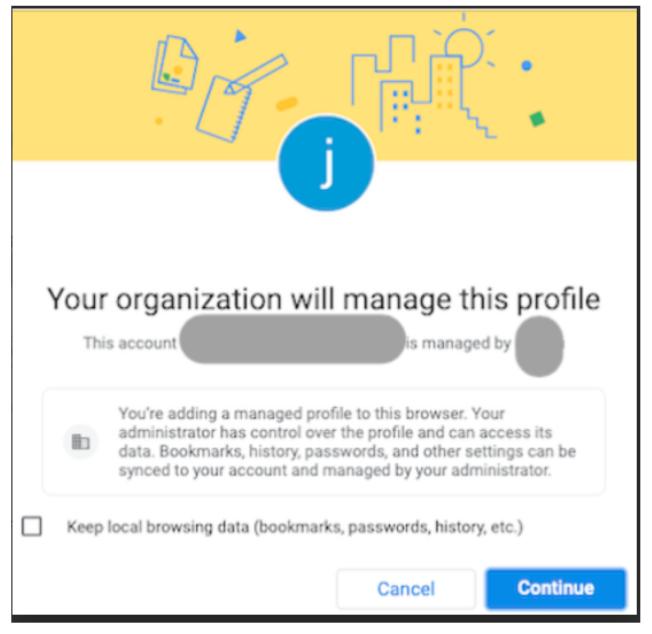
If you have logged into a Google Chrome Profile you may have seen a message that looks like the image below. 


Google has recently released an update in which they are taking more steps to separate personal information data from enterprise-managed data. 


What does this mean? 

This means that when you are using Chrome you will need to be logged into a Chrome profile with sync, or use guest mode. We recommend that you select the box next to “Keep local browsing data (bookmarks, passwords, history, etc.)” if you will not be using a Guest profile. To learn more about using Chrome Profiles please refer to this article. This will ensure that you keep all of your saved data like bookmarks and passwords. Please refer to this article for guidance on turning sync on and off. 


Please feel free to reach out to its@manhattan.edu with any questions or concerns. 


Wednesday, July 28, 2021

ITS: Google Drive Security Update

ITS would like to make you aware of a new Google Drive security update coming soon. 

Beginning on September 13, 2021 Google will be applying a new security update to some of your shared files. This means that if you have shared a file with someone and they have not yet opened it, after September 13th they will need to request access to it to view it. This may cause an increase in access requests. Those who have already viewed the files will still be able to.

To find out which files will be impacted you can follow these instructions

For questions or further assistance please contact ITS at its@manhattan.edu or 718-862-7973

Wednesday, December 16, 2020

Holiday Break Phishing Scam Protection

Phishing attacks are on the rise and we are taking steps to prevent these attacks from affecting Manhattan College. ITS would like to request your assistance by asking for your hyper vigilance in regards to potential phishing scams by doing the following: 

1. Never respond to any suspicious or unfamiliar emails. 

2. Report any of these suspicious emails to ITS by forwarding the message to its@manhattan.edu for validation.

3. If you think your account has been compromised contact ITS immediately at 718-862-7973 or emailing its@manhattan.edu

For more information about Phishing scams and how to protect yourself this holiday season please check out the links below:

Two laptops, suspicious man on one fishing the personal data from the otherHoliday Scams and Malware Campaigns
Phishing Infographics
Half of all Phishing Sites Now Have the Padlock


As we approach the Christmas Holiday break, ITS would like to remind campus users that we will NOT be performing updates and will NOT ASK for information from you.   

  • ITS will NOT ASK for you to update your password or other personal information.

  • ITS will NOT DISABLE your account over the break if you do not respond to an email.


Friday, October 9, 2020

Important Reminder: Update VIA App

ITS is aware that some clients are experiencing issues when using the Kramer screencasting program. We will begin to update the Kramer Systems soon and ask that you do the following:


We are asking that you check to make sure that your App on your device is fully up to date. When you open the app up and it prompts you to update to the latest version, please do so. This will help to mitigate potential issues during usage. 


Friday, September 25, 2020

The Instagram Bug That Could Make You Vulnerable To Hackers

Saving a single image to a mobile device can allow a cyber attacker to access your location data, contacts, files stored on the device and camera. Check Point's head of security, the world’s leading cyber security provider, describes the process as the attacker sending an image to the target's email, text message or any other communication platform. The picture is then saved to the target's mobile device and once saved the target opens Instagram it gives the attacker full access to the users phone and data.

To protect yourself from this type of invasion of privacy you should regularly:


  • Update the apps and operating systems on your mobile device.

  • Pay attention to the kinds of approvals and permissions you are giving to app developers. You should always read the fine print before approving permissions. 


For more information, please check out this article


Friday, June 12, 2020

Update to Tiled View in Google Meet

Be on the lookout for an updated version of Tiled View in Google Meet! 

Google has announced that they are releasing an improvement to the Tiled View on Google Meet. The improvement will allow users to see other attendees even when someone else is presenting. For more information about this update please visit this link.  

For additional information about the different views and how they work please reference our knowledge base article

Tuesday, June 2, 2020

Updated GridView Extension Available

A new version of the GridView Chrome extension has been released. The current version is 1.35. You should get the latest version automatically. If you haven’t already received the update and want to manually update, please view these instructions.


Previously ITS had reported a fix for the removal of more than one GridView extension. We have been made aware that some users are still experiencing issues after removing the second extension. This is, because you may need to clear your cache after you uninstall the extension. Please refer to this article for further assistance with clearing your cache.

Thursday, April 16, 2020

Google Meet Grid View Distubance Due To Chrome Update

ITS is aware that some people may be experiencing issues with their Google Meet grid view extension. If you are having issues please know that it is due to the release of a new Chrome update. If you continue to experience disruptions to your Grid View extension please make sure that you have updated your Chrome browser and are using the latest version of Chrome. In addition to this ITS recommends that after your update your browser, uninstall and then reinstall the extension if you are still experiencing issues. 

You can check what version of Chrome you are using by accessing your Chrome settings or by following these directions. Please use this link for further assistance to update Google Chrome.