Tuesday, February 28, 2017

Utilize Action Items to Work More Productively with Google Docs

One of the core promises of Google Docs is to help you and your team go from collecting ideas to achieving your goals as quickly and easily as possible. That’s why Google Docs recently launched Explore in Docs, Sheets and Slides — with machine intelligence built right in — to help your team create amazing presentations, spreadsheets and documents in a fraction of the time it used to take.

Try out two new time-saving features designed to speed up and simplify the way you work, so you can focus on bringing your team’s ideas to life.
1. Spend less time figuring out who owns what with Action Items

According to research by the McKinsey Global Institute, employees spend about 20 percent of their work week — nearly an entire day — searching for details internally and tracking down colleagues for answers. This can be especially true when a document is full of ideas, requests and comments, making it difficult to get a clear sense of who’s responsible for what.

To help keep your projects moving, when you type phrases like “Ryan to follow up on the keynote script,” or “Andrea to schedule a weekly check in” on desktop, Docs will intelligently suggest an Action Item to assign to the right person, thanks to Natural Language Processing (NLP).


You can also manually assign an Action Item to someone in the Docs, Sheets and Slides desktop and mobile apps by mentioning their name in a comment and checking the new Action Item box. The assignee will get an email notification and see the Action Item(s) clearly highlighted with a blue bar when they open the file.


2. Spend less time searching for the files that need attention

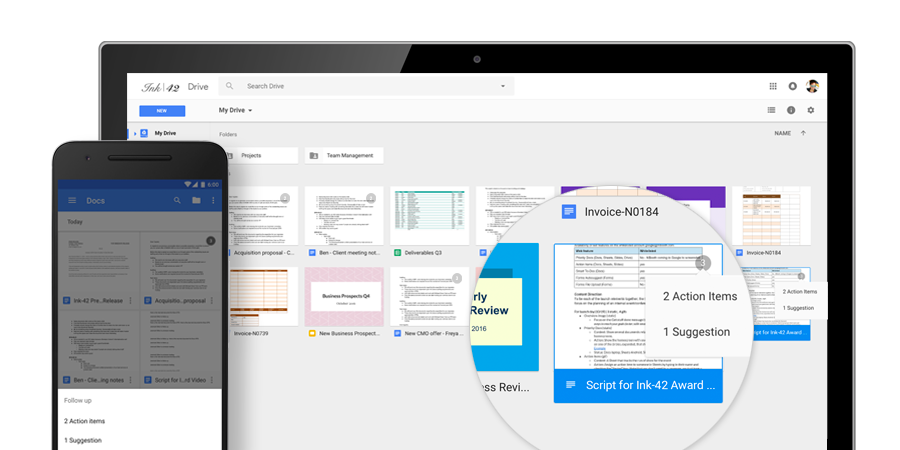
Once Action Items have been assigned, it’s easy for team members to identify documents, spreadsheets and presentations that need their attention. The next time they visit Docs, Sheets, Slides (or Drive) from their laptops or mobile apps, they’ll see a badge on any files with Action Items assigned to them, plus any unresolved suggestions that others have made to their files.
partially reposted from gsuiteupdates.googleblog.com/2016/10


Amazon Web Service (AWS) Outage Affecting Multiple Web Services/Sites

AWS is the backbone of many website and services that you likely use.  We want to make you aware that this backbone is experiencing outages today that may affect these services.  This is not a Manhattan College issue, but an Amazon issue.  Please see below links for more information:

https://twitter.com/awscloud

https://status.aws.amazon.com/


Amazon Web Services (AWS) May Affect Ticketing Emails

We received the following notice from our ticketing system service provider.  Should you email the ITS ticketing system and not hear back, please call x7973 to follow up.  Links have been added below for updates.

TeamDynamix Outgoing Email Outage
TeamDynamix has identified an issue with outgoing email starting at approximately 1:37 PM ET today (2/28/2017). We are currently working directly with Amazon to resolve the issue. The issue appears to be linked to the Amazon Web Services S3 outage described here

Most outgoing email delivery will be delayed until this issue is resolved. Unsent emails will be queued and sent at a later date. No messages will be lost.

We will send an update in 1 hour or when the outage is resolved, whichever comes first. We will continue to send hourly updates until the issue is resolved.

We apologize for the inconvenience.
 
Sincerely,
The TDX Team

Here is a link to the AWS Twitter for more information:

COMPLETED - Emergency system maintenance late Thursday evening (after 1:00 AM) into Friday

Please be advised, ITS will be performing emergency system maintenance late in the evening this Thursday into Friday, 3/3/2017 after 1:00 AM. The system maintenance will temporarily affect a number of vital services. The affected services include:
  • Self-service Banner
  • Sign Sign On (SSO) for Banner
  • Verify and POS stations (the One Card Database will be down temporarily)
  • Evisions
  • DegreeWorks
  • Paypal transactions
Services should be restored within 2 hours of the start of the interruption.

- - - - -

Updated at 1:55 AM, 3/3/2017:


All systems are back online.

Wednesday, February 22, 2017

Make Multimedia Presentations by Inserting Videos from Google Drive in Google Slides

Starting today, you can insert and play your Google Drive videos in Google Slides, in addition to videos from YouTube.


Once you’ve added a Drive video to your presentation, you can choose when to start and end it, whether it should autoplay when presenting, and whether it should be muted or play with audio. Simply right-click on the video and select Video options.


If a person viewing your presentation doesn’t have permission to view a video embedded within it, they’ll be prompted to request access.

Note that while you can play Drive videos in Slides on the web and mobile, you can only insert them from the web application. For more details, visit the Google Help Center.

Tuesday, February 21, 2017

RESOLVED: Public Safety Office Internet Outage

As of 8:50pm, the internet connectivity issue in Jasper Hall and the Public Safety Office has been RESOLVED. We apologize for any inconvenience that this may have caused.

ITS has been made aware of the internet outage affecting Jasper Hall and Public Safety office around 7:30pm. We are currently troubleshooting and investigating this issue. We apologize for the inconvenience.

Monday, February 20, 2017

RESOLVED - Temporary One Card Outage

An issue caused the One Card database to hang late Sunday evening, affecting the POS and Verify stations on campus.

The database was brought back online around 8:40 am this morning.

The issue has since been diagnosed and a fix has been successfully tested on our test environments.

ITS has put a temporary fix in place that will prevent this from happening again. We are also working on scheduling the necessary system maintenance on our production environment to permanently resolve this issue.