Showing posts with label JasperNetID. Show all posts

Wednesday, August 8, 2018

Updates to JasperNet Account Self-Help Tool (start.manhattan.edu) Coming Soon


Updates to the college's JasperNet Account self-help tool: start.manhattan.edu will be released this week.

The 24/7 start.manhattan account tool allows one to activate a new account, reactivate an old account, and manage account access credentials.

The update better aligns the design with the college's current online web presence. As part of the update, we have also committed to following the practice of accessible web design to insure that the web pages are usable by everyone.

Besides the visual facelift, the tool update includes:
  • a front-page reorganization, with a more prominent Account Management section for existing users to provide or update an account recovery email address and change password, as needed
  • more and better confirmation emails at numerous steps of the account activation and management process, with emphasis on new user onboarding
  • a new Captcha solution, which replaces the challenge of deciphering characters or audio with a simple action to be taken by the person using the site. This functions to ensure that internet users filling out forms are indeed humans, thwarting the amount of spam produced by bots 

We encourage you to take a look at the new tool, and perhaps take the opportunity to update and/or provide a recovery (personal) email address for your account.  This will allow you to recover your account in the future without the involvement of ITS.  We also encourage you to change your password.

Additional workflow enhancements to streamline the employee onboarding process will be added in the coming weeks.

Screenshot of new Start. self-help tool
start.manhattan.edu self-help JasperNet account tool


Friday, August 26, 2016

Moodle Login Update - JasperNet SSO

An update was applied to Moodle overnight that changes the login page
from an older version of JasperNet SSO to the current version that has been in use since the spring.  Previously, Moodle users may have noticed a login page that looked different from all other JasperNet services and were required to login a 2nd time to Moodle.  The update configures Moodle to use the same JasperNet SSO login page as all other JasperNet services.

Moodle users who have connected to Moodle in the last few days may need to restart their web browsers if they encounter an error when attempting to login to Moodle for the first time after the update - which is the result of a browser cache issue.  Restarting the web browser has shown to resolve this problem.  Anyone experiencing this issue should report it to ITS by calling x7973 or emailing its@manhattan.edu  You can also use our online form to #TellITS.

Thursday, August 18, 2016

Self-Service Timeout Update

An update has been applied to the Self-Service timeout page to present a clearer message to users and provide a more intuitive link to reconnect to the Self-Service system.  When a session exceeds the 60-minute inactivity timeout, users will be forwarded to the following updated timeout screen:

First, a message will inform the user that a timeout has occurred.

An orange button for SingleSignOn will be available to reconnect to Self-Service as well as a login box for legacy CWID/PIN access.  The preferred method of access is via the orange SSO button to "Sign In" using your JasperNet ID.


Wednesday, February 17, 2016

Authentication Service Emergency Maintencance

Our Authentication Service is malfunctioning.  We are working to resolve this as quickly as possible.

Tuesday, January 19, 2016

Keep Control of Your Jaspernet Account... Make Sure that Your Personal Email is On File!

We want to make sure that your correct personal email address is on file so that we can verify your account when you are not on site. This is critical if you are troubleshooting Jaspernet account access remotely.

Please follow the instructions here to update your personal email address on file.


Monday, October 5, 2015

Coming Soon... Updates to JasperNet Signon Page

Changes are coming to the JasperNet Single Signon (SSO) page.  The first thing that users will notice is a more streamlined design that will now include a preview of featured campus events as well as important notifications.  In addition to the new design, a number of underlying security enhancements will be included to help prevent "phishing" attempts and provide a more secure experience.


Updates will be rolled out gradually throughout the week of 10/12.  As a result, you may see both the old and the new login page while we transition JasperNet services from the old page to the new page.

If you've accessed any of our TEST environments since August,  you've already been using the new page!

Be on the lookout for additional announcements in the coming days!!


Friday, April 24, 2015

JasperNet Account Security Check

Take a moment to run through Google's Security Checkup. The Security Checkup will insure that recent activity on your account is legitimate, that the add-ins accessing to your account are legitimate, and that the forwarding addresses that have been configured in gmail are legitimate:


If you see any strange account behavior, do not hesitate to contact us at: its@manhattan.edu or (718) 862-7973

Tuesday, February 10, 2015

Today is "Safer Internet Day"

Celebrate by making sure your JasperNet account is properly protected. Google has put together a step-by-step Security Checkup, and it only takes a few seconds. Give it a go: Google's Security Checkup

Thursday, November 13, 2014

Updates to Banner Login Page Coming Soon.....

An updated Banner login page will be released to the campus community on Monday 11/24.  Enhancements to the login page will include an updated design, easier navigation, and the option of using you JasperNet ID for login (SSO).


The login page for Banner Self-Service (http://self-service.manhattan.edu) was upgraded in spring 2013 to include a number of design and navigation enhancements as well as the integration of JasperNet Single-SignOn (SSO) allowing faculty, students, and administrators to access Self-Service with their JasperNet ID and password - eliminating the need to remember a separate Login ID and PIN.  Today, the same enhancements have been applied to the Banner login page.

Although the existing login page will still be available through 11/23, a "Sneak Peak" option is available to anyone who'd like to try the new page before it launches on Monday 11/24.  The temporary link to the new login page can be found on the current Banner menu at http://banner.manhattan.edu

The new login page consists of a completely updated design to better match the College website and other JasperNet services.  Prominent links will be available to login with both your JasperNet ID (SSO) or your Banner ID (Legacy).


Thursday, September 25, 2014

Get insight into your inbox with Gmail Meter

Ever wonder how many email messages you actually get, read, reply-to?  Have a look at Gmail Meter - http://gmailmeter.com/  Gmail Meter is an add-on to any Gmail account (including your JasperNet Email account) that gives you insight into your inbox.


Wednesday, August 20, 2014

JasperNet Login Page Enhancements

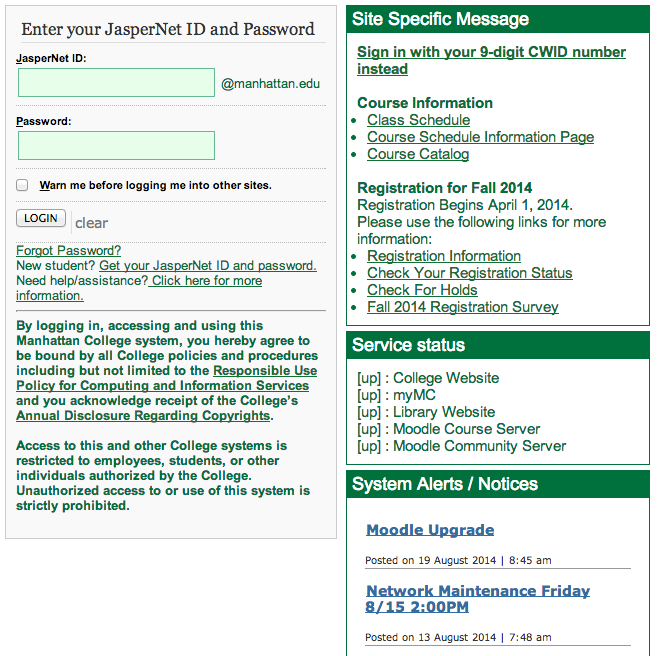
A number of improvements have been made to the login page for JasperNet services to make accessing campus systems easier and more secure.  Based on feedback received from the campus community, there is now more information and help resources available on the JasperNet login page including information about the service, where to go for help, and how to retrieve a lost username/password.

In the main login box, there are now links to:

  1. Retrieve a lost or forgotten password.
  2. Activate your your account.
  3. Get additional help.

Each service will have a "Site Specific Message" box with more information about the service and "public" links that can be accessed without authenticating that may have general information about the service.

The "Service Status" box now lets users know if there is a problem with JasperNet services.

The new "System Alerts/Notices" box lists important notifications to the community such as planned maintenance or upgrades.


ITS Student Move-In Support

ITS will be providing technology support to new and returning student students during the designated move-in days as follows:

Thursday 8/21:  8:00AM - 6:00PM
Saturday 8/23:  8:00AM - Noon
Sunday 8/24:  8:00AM - 6:00PM

During these times, ITS will have dedicated resources for technology questions during move-in.  For assistance, please contact the Client Services office at 718-862-7973 or emailing its@manhattan.edu


Tuesday, June 24, 2014

JasperNet Account Enhancements

A number of enhancements to your JasperNet Account are in the process of being deployed over the course of the summer.  Some of the updates you may already have seen, while others are expected to be in place by the time you return to campus in August.  Based on feedback from the community and developments in technology, ITS has identified a number of changes to make accessing JasperNet services easier and more secure.

SSO - Single-SignOn

Just about all JasperNet services have been updated to use JasperNet Single-SignOn (SSO) for consistent secure access.  Remaining services have been identified and added to a roadmap to have SSO applied in the near future.

Additionally, the JasperNet SSO page has been updated to better identify help resources for users with access issues as well as include more information about the service prior to authentication.  A section with information about retrieving lost usernames/passwords as well as access policies has been added as well as a section highlighting important service-related announcements and updates.


Account Lifecycle

As students become alumni, we’ve made it easier to transition your JasperNet account for use “after Manhattan” by keeping a single username to access JasperNet systems.  While you may not have access to all of the resources that you enjoyed as a student, alumni accounts will still have access to some campus resources including self-service.  For members of the community that take on more than one role, such as an employee taking classes or an alum returning to Manhattan for a career or to further their education, a single username will now allow access to the appropriate resources based on your role(s) at the College.   

As a result of this enhanced account lifecycle, a standard naming convention will be used for ALL accounts generated after 7/1/2014 (student, alumni, or employee).  ITS is working closely with key campus offices to ensure new students and employees are provided their JasperNet account information quickly, easily, and securely.


start.manhattan.edu

ITS has implemented a new JasperNet Account self-help tool at http://start.manhattan.edu  This new tool was first implemented for the class of 2017 to activate their JasperNet Accounts and currently provides users with the ability activate a new account or change the password of their existing account.  By the end of the summer, users will be able to retrieve lost passwords to a personal email account and eventually by text message.  To ensure that you can securely recover a lost username or password, ITS will be asking users without a personal email or cell phone on file to securely update their account via the myMC portal as we approach the Fall 2014 semester.

Tuesday, September 24, 2013

ITS System Outage September 23, 2013

On the evening of September 23, 2013 there was an outage that affected several systems including Moodle, MyMC, and Home Server due to the component failure of our central authentication database.  The cause of the issue has been identified and resolved.  Steps have been taken to prevent the issue from reoccurring.

Wednesday, June 5, 2013

New Student JaspernetID Format

Starting with the incoming Fall 2013 Freshmen class students will have a slightly different JaspernetID name format. Most notable the '.student' nomenclature will be dropped from all new students going forward.

New student accounts will be now be in the form
{First Initial}{Last Name Up to 17 Characters}{2 digit number}

For Example John Q. Public would be assigned a JaspernetID of:
jpublic01
With an email address of:
jpublic01@manhattan.edu

Please note the 2 digit number will not always be '01'.

The reason for this change is to make the transition from a student to an alum account more seamless. Going forward any student who receives a degree from Manhattan College will retain their email address indefinitely eliminating the need to migrate students out to a separate alumni domain after they graduate.

Alumni will continue to have full access to gmail and the google apps infrastructure and will have additional access to on campus resources such as the portal in the future.