Tuesday, July 26, 2022

Windows 8 End of Life Schedule

Every Windows product has a life cycle. The life cycle begins when a product is released and ends when it's no longer supported. Knowing key dates in this life cycle helps you make informed decisions about when to update, upgrade or make other changes to your software. 

Windows 8 Support will end January 10, 2023.
Microsoft Support Reference to determine: Which Windows operating system am I running?

Solution

Manhattan College ITS loads Windows 10 on all ITS supported compatible devices.

Next Steps

If you happen to have a computer with Windows 8 please upgrade your computer before January 10, 2023.  You can contact ITS for assistance.

Friendly Reminder: Back Up Your Data


With the convenience of the cloud and apps like Google Drive, it’s pretty easy to forget to back up your data. This is just a friendly reminder to do so!

Data on Google Drive:

Make sure that you have all of your data backed up either on your hard drive, a storage device, or a separate cloud storage service.

File Streaming:

If you are using Drive File Stream, it is very important that you are regularly checking drive.google.com to make sure that your data is syncing/saving properly. 

Once you’re logged into your google drive via web browser make sure that any files you worked on using drive file stream are present and up to date. You can access your drive via file stream or web browser on any device. 

Losing data can be incredibly stressful, but it is preventable! Here are some previously shared tips: 

  • Your critical data should never reside in a single place.
  • The ideal backup strategy will typically include both an online backup service (Google Drive) to ensure your data is secure no matter what happens to your mobile device or computer.
  • Running consistent, automatic backups is a straightforward process that will take a little time to set up and will require even less to maintain.
  • Backups can be configured to run in real time when files on your computer are changed.
  • Routinely test your backup solution to ensure you can recover your data in the event that you do actually need to restore from a backup.
If you have any questions or concerns about this please reference our knowledge base articles or contact the ITS Help Desk for further assistance! 

Information partially taken from: https://er.educause.edu/blogs/2017/9/september-2018-do-you-have-a-personal-backup-plan 

Monday, June 27, 2022

Banner Communication Manager Could Help You!

If you are finding yourself in need of sending a large email communication, Banner Communication Manager (BCM) may be a helpful resource for you! It saves you from manually inputting large amounts of email addresses and can also help personalize mass emails. If you are interested in learning about how to use BCM you can check out this article. 


If this is something you would like to explore further please email its@manhattan.edu for a BCM Consultation to arrange a setup and training session.

Now Available: Instant ITS Blog Updates!

ITS has recently changed the way you can subscribe to our blog. 

This new subscription will allow you to get instant updates when a post is shared to the blog straight to your inbox! This is done by joining a Google group that sends out an email each time a post is shared. If you'd like to subscribe, please refer to this guide. 

Please note that if you have already subscribed but want to receive ITS blog updates faster by joining the group, you will need to subscribe using this link. 

Wednesday, June 15, 2022

Google Chrome Profile Update

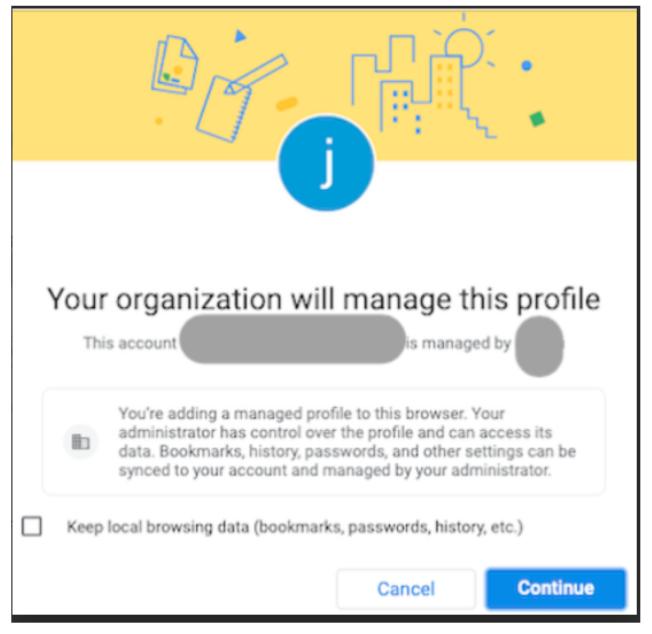
If you have logged into a Google Chrome Profile you may have seen a message that looks like the image below. 


Google has recently released an update in which they are taking more steps to separate personal information data from enterprise-managed data. 


What does this mean? 

This means that when you are using Chrome you will need to be logged into a Chrome profile with sync, or use guest mode. We recommend that you select the box next to “Keep local browsing data (bookmarks, passwords, history, etc.)” if you will not be using a Guest profile. To learn more about using Chrome Profiles please refer to this article. This will ensure that you keep all of your saved data like bookmarks and passwords. Please refer to this article for guidance on turning sync on and off. 


Please feel free to reach out to its@manhattan.edu with any questions or concerns. 


Monday, June 13, 2022

Planned Outage: Banner/Oracle Maintenance - Complete


Dear Manhattan College Community,
The Oracle Migration is complete. Thank you everyone for your support in this effort.

Information Technology Services


Dear Manhattan College Community,

Information Technology Services will be migrating our Oracle environment from an "on premise" model (hosted in our datacenter) to the Oracle Cloud.

This will require that our Oracle environment be offline beginning on Friday, June 10th at 6:00pm - Sunday, June 12th until 10:00pm.  This includes Banner and any secondary software associated with Banner i.e., Self-Service.  Additionally, we will work diligently to limit the downtime especially for Banner Self-Service.

Also, starting on May 24, 2022, ITS will institute a freeze on any new banner releases or patches in order to keep the integrity of our Test system and Banner Production environments intact unless related to an emergency fix from Ellucian or a time-sensitive patch released by the government.

Thank you for your patience during this important migration.

Information Technology Services

Wednesday, June 1, 2022

Campus Network Outage

Update June 2, 2022 7:20AM: Outage is resolved. There was an equipment malfunction that was attended to.

 We are aware of an outage affecting Network and Phones on campus.